Match Pictures To Words Puzzle
Review
Match Pictures To Words offers a clean and intuitive interface that makes learning new words enjoyable for children. The two modes provide flexibility: Easy mode allows free exploration without pressure, while Normal mode adds a gentle challenge with three lives. The cheerful music and positive feedback encourage repeated play. It is a reliable tool for parents and teachers to support early vocabulary development. The game avoids any complex mechanics, focusing purely on matching pictures to words, which keeps young learners engaged without frustration.
About This Game
Game Introduction
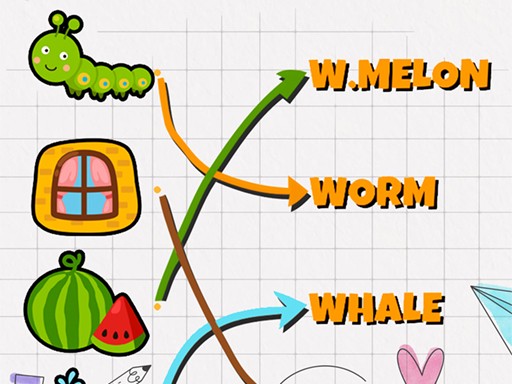
Match Pictures To Words is a delightful and educational puzzle game that helps players build vocabulary and recognition skills. The core objective is to match pictures with their corresponding words in a simple, intuitive interface. Designed with young learners in mind, the game offers a safe and fun environment for kids and families to enjoy together. Its cheerful music and straightforward gameplay make it an engaging way to learn new words while having fun.
How to Play
Playing is easy and intuitive. Players use their mouse to click and drag a picture, then drop it onto the correct word. A correct match shows a positive message, while an incorrect match provides feedback to help learning. The game includes two modes: Easy mode allows free, stress-free play without penalties, while Normal mode introduces a challenge with a limited number of lives. This simple drag-and-drop mechanic makes word recognition practice enjoyable for all ages.
Game Features
Two game modes are available: Easy and Normal, catering to different skill levels and preferences. The user-friendly interface is designed to be accessible for young children. The game includes a cheerful kid's music theme and sound effects that enhance the learning experience. The gameplay is simple and focused, making it easy for beginners to pick up and play without complicated instructions.
Tips for Success
To get the most out of the game, start with Easy mode to build confidence and familiarity with the words and pictures. Pay close attention to the feedback provided after each match, as it helps reinforce correct associations. Practice regularly to improve word recognition speed. For a greater challenge, switch to Normal mode to test your skills under pressure. Most importantly, take your time and enjoy the learning process.