
World Design & Navigation
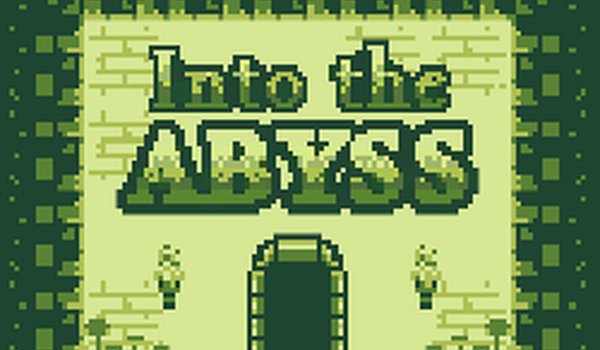
Depths Navigator Classic Side-Scroller presents a hand-crafted pixel world where every screen holds potential secrets. The environment is built around interconnected areas that encourage players to revisit locations after gaining new skills. Vertical and horizontal paths weave through caves, ruins, and forests, each with distinct visual themes. The map is not linear, so players must pay attention to landmarks and subtle clues to find their way. Save points are placed at key junctions, allowing players to record progress and take breaks without losing their place. The world feels alive with small animations and color shifts that hint at hidden routes.
Ability Progression System
As players advance, they earn movement upgrades that change how they interact with the world. The double jump lets players reach high ledges, while the wall slide allows traversal along vertical surfaces. These abilities are not just for show—they are required to access new sections and solve environmental puzzles. Each upgrade is introduced in a safe area where players can practice before facing more complex challenges. The progression feels natural, with each new skill opening up previously unreachable areas. This system rewards thorough exploration and careful observation of the surroundings.
Visual & Audio Atmosphere
The pixel art style uses a limited color palette that evokes classic 16-bit games while maintaining a clean, modern look. Character sprites are small but expressive, and background layers create a sense of depth. The soundtrack features chiptune melodies that change with the environment, from calm exploration themes to more intense tunes during key moments. Sound effects are minimal but effective, providing feedback for actions like jumping, landing, and interacting with objects. The overall presentation aims to immerse players in a nostalgic yet fresh experience.
Family-Friendly Design Choices
The game avoids graphic violence and mature themes, focusing instead on puzzle-solving and discovery. There are no enemies that require combat; obstacles are environmental, such as gaps, spikes, and moving platforms. The difficulty curve is gentle, allowing younger players to progress with patience and practice. Controls are simple and responsive, with keyboard-only input that is easy to learn. This makes the game suitable for family play, where parents and children can explore together without concerns about inappropriate content.
Structure & Objectives
While exploration is the core activity, the game provides clear goals through ability gates and a final encounter. Players must collect certain upgrades to reach the end, which adds a sense of purpose to the wandering. The final area presents a challenge that tests the skills learned throughout the adventure. There are no time limits or score attacks, so players can proceed at their own pace. This structure gives a satisfying arc without forcing a rigid path, letting each player discover their own route through the world.








Comments
0 comments